You’ve been staring at your website, knowing it could perform better. Maybe the traffic’s there but conversions aren’t. Maybe visitors leave faster than they arrive. Or perhaps you’ve just got that nagging feeling that your site isn’t pulling its weight.
Here’s the good news: you don’t need a complete redesign or a six-month development project to see meaningful improvements.
What you need are quick wins: the kind of changes you can implement today that deliver immediate, measurable results. These aren’t theoretical exercises or nice-to-haves. They’re practical actions that hundreds of businesses have used to turn their websites from passive brochures into active sales tools.
Let’s dive into seven changes you can make right now.
1. Speed Up Your Page Load Times (Because Every Second Counts)
Here’s a stat that should grab your attention: bounce rates increase by 32% when your page load time extends from one to three seconds. That’s not a typo. Two extra seconds can cost you nearly a third of your potential visitors.
Your visitors won’t wait. They’ll hit the back button and find your competitor instead.

Why this matters: Google factors page speed into search rankings, and real humans factor it into whether they trust your business. A slow site signals unprofessionalism, regardless of how good your actual services are.
Your immediate action steps:
- Enable caching on your website (if you’re on WordPress, plugins like WP Rocket or W3 Total Cache can do this with one click)
- Compress your images (we’ll cover this more in point three)
- Minimise CSS and JavaScript files
- Consider upgrading your hosting if you’re on a budget shared plan
Don’t overthink this. Start with the hosting and caching. Those two changes alone can shave seconds off your load time.
2. Set Up a Content Delivery Network (CDN)
A CDN sounds technical, but the concept is simple: instead of serving your website from one location, you deliver it from servers all around the world, closer to where your visitors actually are.
Think of it like having multiple warehouses instead of one. Someone in Manchester doesn’t need to fetch your website files from a server in London: they can grab them from a nearby location instead.
Why this matters: Every physical mile between your server and your visitor adds milliseconds. Those milliseconds add up. A CDN dramatically reduces this distance, making your site feel faster regardless of where someone’s browsing from.
Your immediate action steps:
- Sign up for Cloudflare (they offer a free tier that’s perfectly adequate for most small businesses)
- Connect it to your website (most hosting providers make this straightforward)
- Let it handle the heavy lifting of distributing your content
This isn’t just for enterprise websites. Even small businesses see noticeable improvements, especially if you’re targeting customers across multiple regions.
3. Optimise Every Single Image
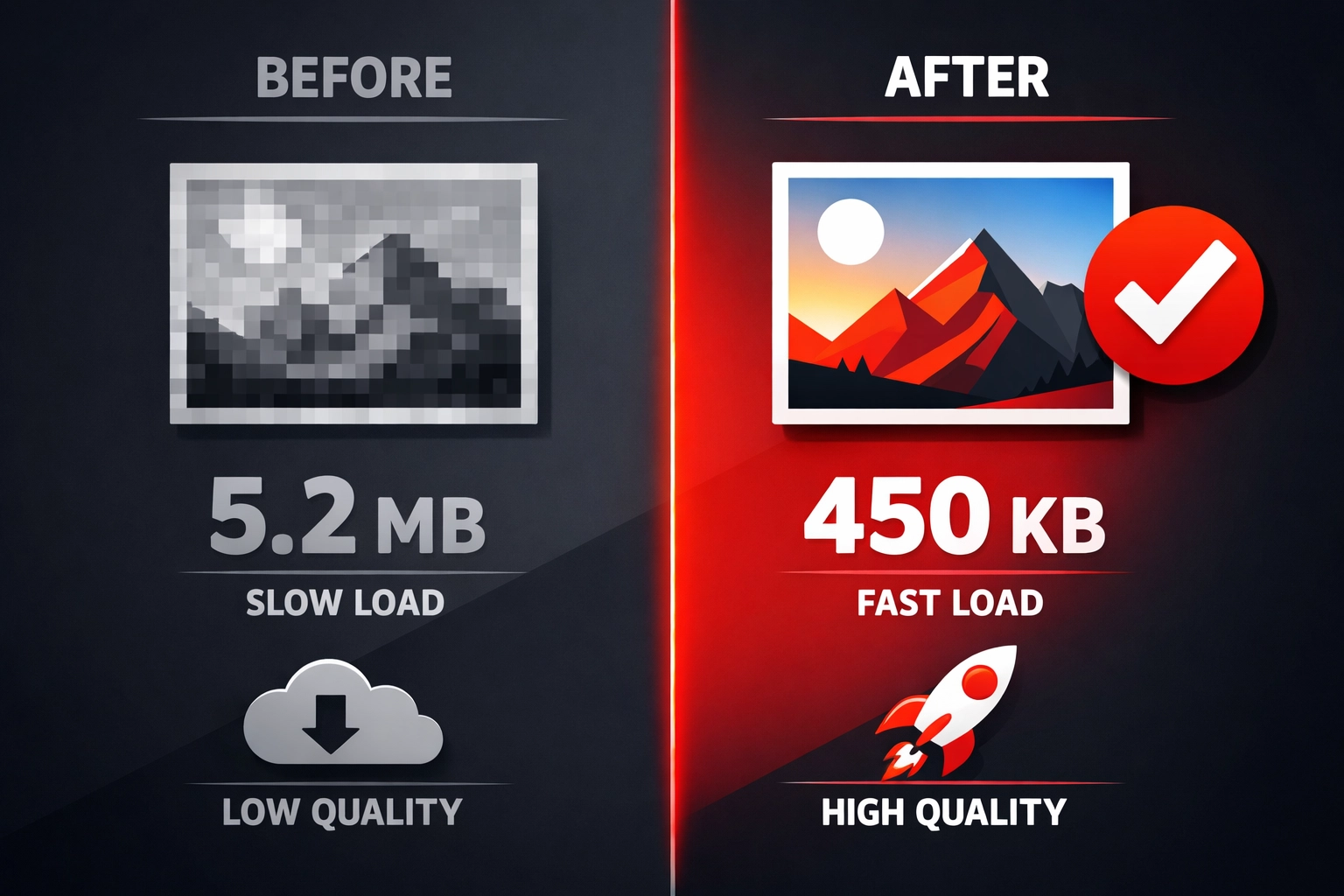
Here’s something that surprises most business owners: images typically account for the majority of your page weight. A single unoptimised photograph can weigh more than your entire text content combined.
You’re literally making your visitors download megabytes of unnecessary data.
Why this matters: Those massive image files are killing your page speed, eating into mobile data allowances, and frustrating visitors on slower connections. But here’s the thing: you can reduce image file sizes by 70-80% without any visible quality loss.

Your immediate action steps:
- Use compression tools like TinyPNG or ShortPixel to shrink existing images
- Convert images to WebP format (modern browsers support this, and it offers better compression)
- Set proper image dimensions: don’t upload a 4000px wide image when you’re only displaying it at 800px
- Implement lazy loading so images below the fold only load when visitors scroll to them
Start with your homepage and your most-visited pages. You’ll see the difference immediately.
4. Add an Announcement Bar to Direct Attention
You’ve got something important to say: an offer, a new service, a key piece of content. But where do you put it? Buried in the middle of your homepage, it gets lost. In the footer, it might as well not exist.
An announcement bar solves this problem instantly.
Why this matters: That sticky bar at the top of your site interrupts the natural scanning pattern and directs attention exactly where you want it. It’s prime real estate that you can change whenever you need to highlight something new.
Your immediate action steps:
- Install an announcement bar (most website builders and WordPress themes include this feature)
- Keep the message clear and action-focused: one sentence maximum
- Link to your highest-performing offer, newest content, or upcoming event
- Make it closeable so you’re not annoying visitors who’ve already seen it
Don’t overthink the message. “New Guide: How to Choose the Right Digital Marketing Agency” works better than clever wordplay that nobody understands.
5. Prioritise Your Above-the-Fold Content
“Above the fold” means everything visitors see before they scroll. It’s your first impression, your hook, your chance to prove you’re worth their time.
If this section loads slowly, visitors experience lag and doubt. They question whether your site works properly. They wonder if clicking deeper will be equally frustrating.
Why this matters: You can have a relatively slow site overall but still feel fast if your above-the-fold content loads immediately. It’s about perceived performance: making visitors feel like your site is responsive even whilst other elements load in the background.
Your immediate action steps:
- Identify your critical above-the-fold elements (header, hero section, primary headline)
- Inline critical CSS instead of loading it from external files
- Defer non-essential scripts that aren’t needed immediately
- Use priority hints to tell browsers which images matter most
This requires a bit more technical knowledge, but the impact is substantial. If you’re working with a developer, make this a priority request.
6. Build an ROI Calculator or Useful Tool
Here’s a question: what makes visitors stay on your site, engage with your content, and actually remember you exist?
Interactive tools. Specifically, calculators that help them make decisions or justify purchases.
Why this matters: A well-designed calculator serves multiple purposes. It keeps visitors engaged longer. It captures information (if you gate the results). It provides genuine value that positions you as helpful rather than sales-focused. And it gives your potential clients ammunition to take internally when they need to justify a purchase.
Your immediate action steps:
- Identify what your clients struggle to calculate (ROI from marketing spend, potential savings, cost comparisons)
- Build a simple calculator using tools like Outgrow or Typeform
- Make it genuinely useful: don’t just create a lead capture form disguised as a tool
- Promote it prominently on relevant pages
For digital marketing specifically, consider calculators for potential traffic increases, conversion rate improvements, or the cost of doing nothing versus investing in professional services.
7. Run A/B Tests on Your Highest-Traffic Pages
You think you know what works on your website. You probably don’t.
Neither do we, until we test. That’s why A/B testing exists: to replace opinions with data.
Why this matters: Your homepage, service pages, and contact page receive the most visitors. Even small improvements to conversion rates on these pages deliver outsized returns. A 10% improvement in your homepage conversion rate doesn’t sound dramatic, but if you’re getting 1,000 visitors monthly, that’s 100 more leads over the year.
Your immediate action steps:
- Use tools like Google Optimise (free) or Hotjar to set up tests
- Start with one element: headline, call-to-action button, hero image, or form length
- Let tests run until you have statistical significance (usually a few hundred visitors per variation)
- Implement the winner, then test something else
Don’t test multiple elements simultaneously on your first go. Keep it simple. Change your headline and see what happens. Change your primary button colour. Test whether a short form converts better than a long one.
Where to Start Right Now
You’ve got seven options. You might be wondering which to tackle first.
Here’s our recommendation: start with page speed. Specifically, compress your images and enable caching. These deliver the quickest, most noticeable improvements with the least technical complexity.
Once those are done, add your announcement bar: it takes minutes and immediately gives you a tool for directing visitor attention.
Then move through the rest based on your specific situation and technical comfort level.
The key is taking action today, not planning perfectly for next month. Your competitors aren’t waiting. Your potential customers aren’t getting more patient. And your website won’t improve itself.
Pick one item from this list. Implement it today. Then pick another tomorrow.
That’s how quick wins become lasting competitive advantages.
If you need help implementing any of these changes: or want to talk through which improvements would deliver the biggest impact for your specific business: we’re always happy to chat. Sometimes having an experienced team handle the technical details whilst you focus on running your business is the biggest quick win of all.
Frequently Asked Questions
1) What is the fastest way to improve my website today?
Start with page speed. Compress your images and enable caching first, because these changes deliver the quickest and most noticeable improvements with the least technical complexity.
2) Why does page speed matter so much for website performance?
Bounce rates increase by 32% when page load time extends from one to three seconds. A slow site also affects trust and search rankings, making visitors more likely to leave and choose a competitor instead.
3) What is a CDN and how does it help my website?
A Content Delivery Network delivers your website from servers closer to your visitors, reducing delay and making your site feel faster regardless of where someone is browsing from.
4) Why should I optimise every image on my website?
Images usually account for the majority of page weight. Large unoptimised files slow down load times, frustrate mobile users, and increase the amount of unnecessary data visitors need to download.
5) What does an announcement bar do?
An announcement bar highlights one important message at the top of your site, helping direct attention to an offer, new content, or a key service without burying it elsewhere on the page.
6) What does “above the fold” mean on a website?
Above the fold refers to everything visitors see before they scroll. This section forms the first impression and should load quickly to make your site feel responsive and trustworthy.
7) Why should I build an ROI calculator or interactive tool?
Interactive tools keep visitors engaged, provide practical value, and help them make decisions. They can also support lead generation if you use them to encourage contact or capture information.
8) What is A/B testing and why should I use it?
A/B testing compares two versions of a page element, such as a headline or button, to see which performs better. It replaces assumptions with real data and helps improve conversions over time.
9) Which pages should I test first with A/B testing?
Start with your highest-traffic pages, such as your homepage, service pages, and contact page. Even small improvements on these pages can create meaningful gains in leads and enquiries.
10) Which quick wins should I prioritise first?
Begin with page speed improvements, especially image compression and caching. After that, add an announcement bar, then work through the other quick wins based on your technical comfort level and business priorities.