

Your website should be working for you. But if you’re not getting enquiries, seeing traffic, or converting visitors into customers, something’s not right.
The truth is, most Bristol businesses make the same handful of mistakes with their websites. These aren’t massive technical failures or expensive problems to solve. They’re simple oversights that quietly cost you business every single day.
Let’s walk through the seven most common mistakes we see: and more importantly, how you can fix them.
1. Your Website Is Invisible to Local Customers
Here’s the thing: having a website doesn’t mean people can find it.
If you haven’t set up local SEO properly, your business is essentially invisible when Bristol customers search for what you offer. You could have the best services in the city, but if you’re not appearing on Google when someone searches “accountant near me” or “plumber in Bristol,” you might as well not exist online.
How to Fix It:
First, claim your Google Business Profile if you haven’t already. Fill out every section: business hours, photos, services, your address. Get reviews from happy customers. This is your foundation.

Next, make sure your website uses location-based keywords naturally. If you’re a digital marketing agency in Bristol, say that. If you serve specific areas like Clifton, Bedminster, or Fishponds, mention them on your website.
Finally, list your business in local directories. Yelp, Yellow Pages, and industry-specific directories all help signal to Google that you’re a legitimate local business.
Want to know if your website is optimised for local search? Check out our guide on why SEO matters for UK businesses.
2. Your Contact Information Is Playing Hide and Seek
You’d be surprised how many businesses bury their phone number, address, or opening hours somewhere deep on their website.
If a potential customer has to hunt for basic information, they won’t. They’ll leave and find a competitor who makes it easy.
How to Fix It:
Put your phone number at the top of every page. Make it clickable so mobile users can call you instantly.
Display your address clearly, especially if you have a physical location. If you’re a service business covering specific Bristol areas, list them explicitly. Your customers need to know you serve them.
Keep your contact information consistent across your website, Google Business Profile, and any directories you’re listed in. Inconsistencies confuse Google and hurt your visibility.
3. Your Website Looks Like It’s From 2010
Here’s what happens when someone lands on an outdated website: they assume your business is outdated too.
Blurry images, clunky layouts, mismatched fonts, and websites that don’t work properly on phones all send the same message: you’re not keeping up.
How to Fix It:
You don’t need a complete website redesign Bristol businesses often overspend on. Start with the basics:
- Use high-quality, relevant images
- Make sure your site looks good on mobile (most of your visitors will be on their phones)
- Keep your design clean and consistent: same colors, same fonts, same spacing throughout
- Remove anything that feels cluttered or confusing
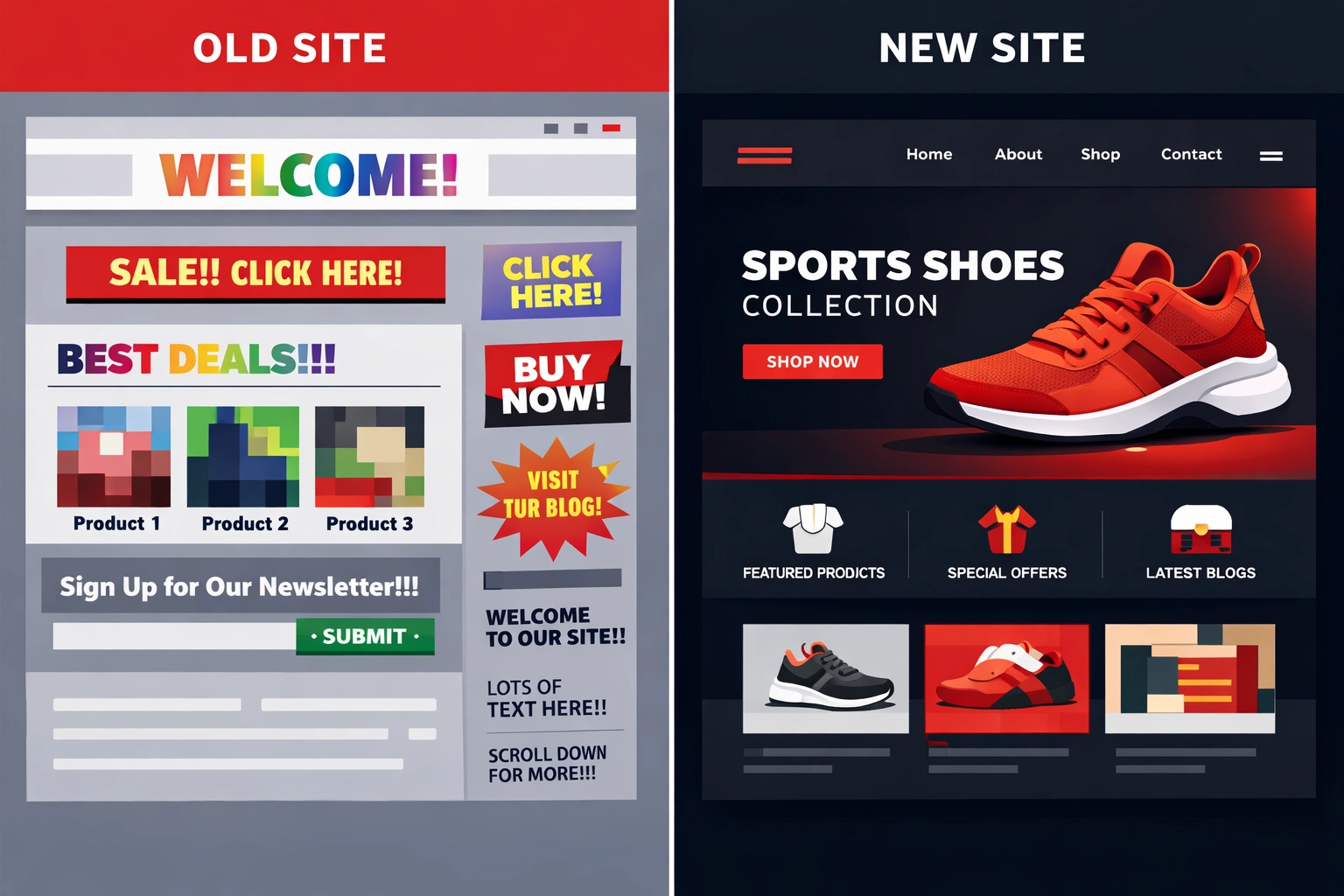
If your website is genuinely old (think 5+ years), it might be time for a refresh. Modern websites load faster, rank better, and convert more visitors into customers.
Feeling a bit embarrassed by your current site?
If you’re thinking, “I know it looks rough, but I don’t even know where to start,” you’re not alone. The fastest way to get clarity is to see your site the way a customer sees it.
Try our Website Preview Tool: https://bamsh.co.uk/website-preview-tool/
Why This Matters:
When you’re too close to your own website, you stop noticing the stuff that quietly puts people off (awkward layouts, cramped text on mobile, unclear calls-to-action).
How It Helps You:
You get a clear visual snapshot you can use to decide what needs a quick refresh vs what needs a proper rebuild, without guessing.
In the next section, we’ll look at another easy-to-miss issue that stops people taking action.
4. Important Information Is Buried or Missing
You know what frustrates visitors more than anything? Having to click through multiple pages to find what they’re looking for.
When someone visits your website, they have questions. What do you do? How much does it cost? What are your hours? How do I contact you?
If these answers aren’t easy to find, people leave.
How to Fix It:
Put yourself in your customer’s shoes. What are they trying to find out? Make that information front and center.
Create a clear services page that lists exactly what you offer. Don’t make people guess or decipher vague descriptions.
If you get the same questions repeatedly, build an FAQ section. Answer them directly and thoroughly.
Make your call-to-action buttons obvious. Whether it’s “Get a Quote,” “Book Now,” or “Contact Us,” visitors should never wonder what to do next.
5. Your Navigation Makes People Work Too Hard
Confusing navigation is one of the fastest ways to lose a visitor.
If your menu is cluttered, your page names are unclear, or important information is buried three clicks deep, people won’t stick around to figure it out.
How to Fix It:
Keep your main navigation simple. Five to seven menu items maximum. Use clear, straightforward labels: not clever or vague terms.
Structure your website so important pages are easy to reach. Don’t bury your services or contact page under multiple levels.

Use clear headings and visual hierarchy on each page. Your most important information should stand out. Use bold text, larger fonts, and clear calls-to-action to guide visitors naturally through your content.
Think about the journey you want visitors to take, then make that path obvious.
6. You’re Talking About Yourself, Not Solving Customer Problems
Most business websites focus on the wrong thing. They talk about the company, the team, the history, the values.
Your customers don’t care. Not yet, anyway.
What they care about is whether you can solve their problem.
How to Fix It:
Rewrite your website content with your customer in mind. Instead of “We offer comprehensive digital marketing solutions,” try “We help Bristol businesses get more customers through their website.”
See the difference? One is about you. The other is about them.
Answer the questions your customers are actually asking. If you’re a web designer, don’t just list your services: explain what happens when someone’s website isn’t generating leads and how you fix it.
Use natural, conversational language. Write like you’re talking to a customer across the table, not reading from a corporate brochure.
If you need help with digital marketing strategy, our team at Bamsh Digital Marketing can help you focus your messaging on what matters to your customers.
7. Your Website Has Technical Problems You Don’t Know About
Broken contact forms. Dead links. Missing security certificates. Error pages.
These technical issues destroy trust faster than almost anything else. When something doesn’t work on your website, visitors assume you don’t pay attention to details: or worse, that you’re not a legitimate business.
How to Fix It:
Test everything monthly. Click every link. Submit every form. Make sure everything works.

Remove any “coming soon” or “under construction” pages. They make your site look unfinished. If a page isn’t ready, don’t publish it.
Make sure your website has an SSL certificate (the little padlock in the browser). This is essential for security and trust. Most hosting providers offer this for free.
Use free online tools to scan for broken links and errors. Fix them as soon as you find them.
Check your website on different devices and browsers. What looks perfect on your desktop might be broken on mobile.
What Happens When You Fix These Mistakes?
When you address these issues, your website starts working the way it should.
You’ll show up when local customers search for your services. Visitors will find what they need quickly and contact you. Your site will look professional and trustworthy. People will convert from visitors into enquiries.
Most importantly, your website will stop being a digital brochure gathering dust and become an active tool generating business.
Where to Start
Don’t feel like you need to fix everything at once. Pick the mistake that’s costing you the most business and start there.
For most Bristol businesses, that’s usually visibility (Mistake #1) or outdated design (Mistake #3). Both directly impact whether people find you and trust you.
If you’re not sure where your website stands, do a quick audit. Look at it with fresh eyes. Better yet, ask someone who doesn’t know your business to try finding information or contacting you. Their struggles will show you exactly what needs fixing.
If you’re embarrassed by how your site looks right now, start with the Website Preview Tool so you can see what customers see (and what to prioritise): https://bamsh.co.uk/website-preview-tool/
Need help figuring out whether you should update my website or start fresh? Our web design team can help you make that decision based on what makes sense for your business and budget.
Before you spend money, it helps to compare your options side-by-side.
Quick Comparison: Your Next Best Step
| Your situation | What you should do | Why this works | Best Bamsh tool/link |
|---|---|---|---|
| You’re embarrassed by how your site looks, but you’re not sure what’s wrong | Use the Website Preview Tool | You get a quick, clearer view of what a visitor sees so you know what to fix first | https://bamsh.co.uk/website-preview-tool/ |
| You’re getting visits but barely any enquiries | Fix messaging + calls-to-action + page structure | You turn existing traffic into leads instead of “more traffic, same results” | Bamsh Cost Estimator |
| You suspect Google can’t “understand” your business locally | Sort local SEO basics first | You start showing up for Bristol searches that already have buying intent | https://bamsh.co.uk/why-use-seo-uk-business |
| You’re planning a refresh or rebuild and need a realistic budget | Price it properly before you commit | You avoid under-scoping (or overpaying) and set expectations early | Bamsh Cost Estimator |
| You think the site has issues (forms, links, security), but you’re not technical | Run a simple monthly checklist | You catch trust-killers before they cost you leads | Web design team |
Frequently Asked Questions
1) What is the Website Preview Tool?
It’s a quick way to preview your website so you can spot obvious design and usability issues that make your business look less professional than it actually is.
2) Who is it for?
If you’re a business owner thinking “my site doesn’t reflect us anymore” or “I’m a bit embarrassed to send people there,” it’s for you. It’s also useful if you’re about to pay for a redesign and want to sanity-check what needs changing.
3) Will the Website Preview Tool fix my website for me?
No. It gives you clarity and a starting point. If you want done-for-you help, that’s where a refresh/rebuild project comes in.
4) Should I refresh my current site or rebuild it?
If the structure is sound and the main issues are visual, messaging, and mobile layout, a refresh often makes sense. If it’s slow, hard to update, or built on something outdated, a rebuild is usually the cleaner long-term move.
5) How much does a website refresh or rebuild cost in Bristol?
It depends on what you actually need (pages, features, copywriting, SEO, and so on). The easiest way to get a realistic ballpark is the Bamsh Cost Estimator.
The good news? These mistakes are all fixable. You don’t need a massive budget or months of work. You just need to know what’s wrong and take action to fix it.
Your competitors are making these same mistakes right now. Fix yours first, and you’ll be the business that stands out when customers come looking.