
You've just launched your new website. It looks great, the content's brilliant, and you're ready for customers to find you. But when you search for your business on Google… nothing. Not even on page 10.
Don't panic. This is surprisingly common, and the good news is it's usually fixable. Let's walk through exactly why this happens and what you can do about it.
Why Google Hasn't Found Your Website Yet
Here's the thing: Google doesn't automatically know your website exists. New domains aren't magically added to search results the moment you hit publish.
Google discovers websites by following links from other websites it already knows about. Think of it like a web of connections, if your site isn't connected to that web yet, Google's crawler (called Googlebot) simply hasn't found a path to you.
The most common reasons your site isn't showing up:
- You're too new – Brand new websites take time to appear. Google is cautious with new domains because, frankly, there's a lot of spam out there.
- No one's linking to you – Without inbound links from other sites, Google has no way to discover you exist.
- You haven't told Google about your site – If you haven't submitted your site to Google Search Console, you're relying on chance discovery.
- You're accidentally blocking Google – Technical settings might be preventing crawlers from accessing your pages.
- Your site has technical issues – Slow loading speeds, mobile problems, or thin content can stop Google in its tracks.
For Bristol businesses especially, local visibility matters. If you're a Bristol cafe, gym, or consultancy, you want to appear when people search "near me" or include "Bristol" in their query. But you can't skip the fundamental step of just getting indexed first.
Are You Accidentally Blocking Google?
This one catches people out all the time. You might have settings on your website that are actively telling Google "don't look at me."
Check for these common culprits:
Noindex tags – These are bits of code that explicitly tell search engines not to index your pages. They're useful during development, but disastrous if left on a live site. You'll find them in your page headers or meta tags.
Robots.txt file – This file sits in your website's root directory and can block crawlers from accessing certain pages or your entire site. A misconfigured robots.txt is like putting a "Keep Out" sign on your digital front door.
Password protection – If your site requires a login to view content, Google can't access it either. This includes WordPress sites left in "maintenance mode" or "coming soon" states.
Privacy settings – Some website builders have privacy toggles that discourage search engines. Make sure these are switched off for your live site.

The 5 Steps to Get Your Website on Google
Let's fix this. Here's exactly what you need to do, in order.
Step 1: Set Up Google Search Console (Takes 15 Minutes)
Google Search Console is your direct line to Google. It's completely free and absolutely essential.
Head to search.google.com/search-console and add your website. You'll need to verify you own the domain, which usually involves adding a bit of code to your site or updating your DNS records. Your web developer can help if this sounds daunting.
Once verified, Search Console becomes your control panel for monitoring how Google sees your site. You'll spot issues, track what searches bring people to you, and directly communicate with Google about your pages.
Step 2: Submit Your Sitemap (Takes 3 Minutes)
A sitemap is essentially a map of all the pages on your website. It tells Google "here's everything you need to know about my site structure."
Most modern website platforms, WordPress, Shopify, Wix, automatically generate sitemaps. Yours is probably sitting at yourdomain.com/sitemap.xml right now. If you're on WordPress, plugins like Yoast SEO or RankMath create and update this automatically.
Once you've located your sitemap, submit it through Google Search Console. This gives Google a clear roadmap to crawl your entire site efficiently.
Step 3: Check for Blocking Issues (Takes 10 Minutes)
Now let's make sure you're not accidentally telling Google to stay away.
Do a site audit:
-
Search "site:yourdomain.com" in Google. This shows what Google has already indexed. If you see pages, great: you're partially indexed. If you see nothing, there's a blocking issue.
-
Check your robots.txt file by going to yourdomain.com/robots.txt. Look for any "Disallow" rules that might be too broad. It should allow Googlebot to access your important pages.
-
View your page source code (right-click, "View Page Source") and search for "noindex." If you find it in your meta tags, remove it immediately.
-
Test your site's mobile performance using Google's Mobile-Friendly Test tool. Over 60% of searches happen on mobile devices, and Google prioritises mobile-optimised sites.

Step 4: Request Indexing for Key Pages (Takes 2 Minutes)
Back in Google Search Console, use the URL Inspection tool to request indexing for your most important pages: your homepage, main service pages, and contact page.
Type in the URL, and if Google confirms it's not indexed yet, hit "Request Indexing." This bumps your pages up the queue.
Important: don't spam this button. Once per page is enough. Google needs time to process, and repeatedly requesting won't speed things up.
Step 5: Improve Content Quality and Build Authority (Ongoing)
Here's where the real work begins. Getting indexed is one thing; ranking well is another.
Content matters: Each page should have at least 300-500 words of unique, valuable content. "Welcome to our site" doesn't cut it. Answer questions your customers actually ask. Solve their problems. Be genuinely helpful.
Build your link profile: Reach out to Bristol business directories, local chambers of commerce, and industry associations to get listed. These inbound links signal to Google that you're legitimate. For local businesses, citations on platforms like Yell, Bing Places, and local Bristol directories make a real difference.
Create internal links: Link between your own pages. This helps Google understand your site structure and spreads authority throughout your site.
Establish social signals: Active social media profiles and genuine engagement signal to Google that you're a real, active business. Share your content, engage with your community, build your presence.
For Bristol businesses specifically, getting your local SEO right means optimising for location-based searches. Include Bristol in your page titles, create location-specific content, and ensure your Google Business Profile is complete and verified.
What Timeline Should You Expect?
Let's be realistic about this. Google doesn't work overnight.
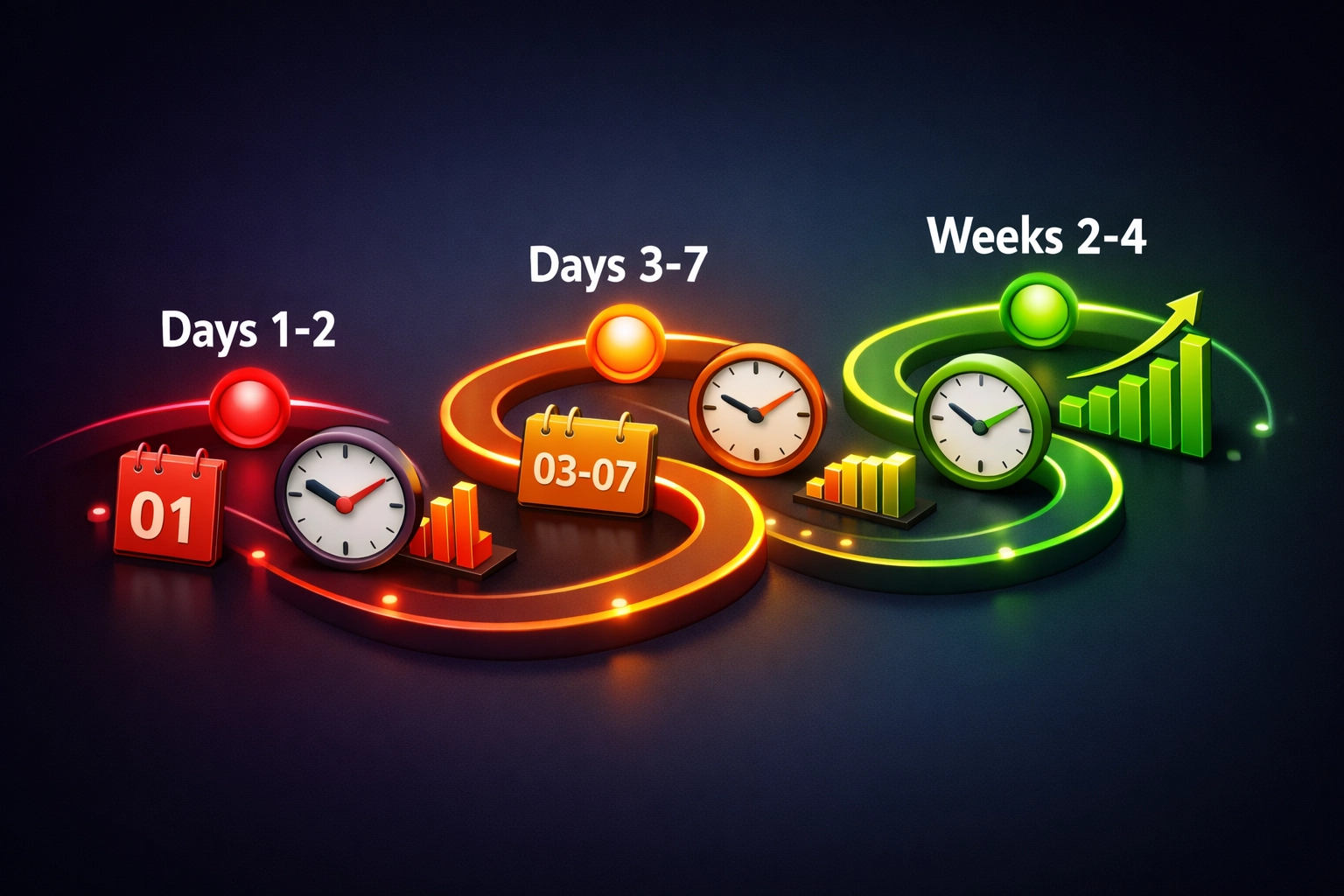
Here's what typically happens:
Days 1-2: Google fetches your sitemap and adds your URLs to the crawl queue.
Days 3-7: Googlebot visits your site and starts indexing your pages. You'll start appearing for branded searches (your business name).
Weeks 2-4: Full site indexing completes as Google crawls deeper into your site structure.
Ongoing: Once established, new content typically indexes within 1-3 days. Your site develops a crawl pattern based on how frequently you update.
If you've followed all five steps and still see nothing after 30 days, something's wrong. At that point, you need a proper technical audit to identify deeper issues: server response problems, canonical errors, or content issues.
When to Get Professional Help
Sometimes, the issue runs deeper than these basic fixes. If you're dealing with a previously penalised domain, complex technical issues, or a highly competitive Bristol market, you might need expert support.
Professional SEO services can conduct comprehensive technical audits, identify crawl errors you'd miss, and build proper link profiles that move the needle.
At Bamsh, we work with Bristol businesses facing exactly these challenges. We've seen it all: from accidentally blocked sites to technically sound sites that just need better content strategy.
Feeling stuck because you can’t picture what “better” looks like?
Here’s the thing: when your website isn’t showing on Google, you’ll often hear advice like “improve your SEO” or “refresh your design”. But if you can’t see the difference a better page layout, clearer messaging, or stronger calls-to-action would make, it’s hard to commit time and budget.
That’s the imagination gap: you know something’s not working, but you can’t visualise what “good” looks like for your business.
Why this matters
If you can’t picture the end result, you’ll usually delay the decision, keep the current site, and stay stuck with:
- pages that don’t explain your offer clearly
- a layout that doesn’t guide visitors to enquire
- a site that Google struggles to understand (because structure and content are messy)
How it helps you
A quick visual preview makes the next step obvious. You’ll know what to fix first, what “modern” actually means in practice, and what your site could look like once it’s built to rank and convert.
Try our Website Preview Tool: https://bamsh.co.uk/website-preview-tool/
It’s a simple way to see how a fresh design and clearer structure could close the imagination gap and give you a site that’s easier for Google (and customers) to understand.
If you’re also weighing up budget, use our Bamsh Cost Estimator to get a realistic ballpark before you commit: https://bamsh.co.uk/cost-estimator/
Website refresh vs “leave it and hope”: a quick comparison
| Option | What you do | What you’ll usually see | Best for |
|---|---|---|---|
| Leave the site as-is | Keep publishing (or do nothing) and wait | Slow or no movement, especially if the site structure is unclear | Sites that are already well-built, just missing a bit of content |
| DIY tweaks | Edit titles, add a few paragraphs, change a button | Small improvements, but often inconsistent | You’ve got time, and your site is technically solid |
| Technical SEO fix | Remove noindex, fix robots.txt, submit sitemap, resolve crawl issues | Faster indexing and fewer errors | New sites or sites accidentally blocking Google |
| Fresh design + clearer structure | Improve page layout, navigation, content hierarchy, and CTAs | Better engagement (time on site, enquiries) and a clearer “theme” for Google | Sites that look fine but don’t explain the offer or convert |
| Preview first (recommended) | Use the Website Preview Tool to visualise improvements | Clarity on what to change and why | You’re unsure what “good” looks like and want direction |
Website visibility FAQs (indexing, design, and the imagination gap)
Can a website redesign help me show up on Google?
Yes, if it improves clarity and structure. A redesign isn’t about “looking pretty”; it’s about making it obvious what you do, where you are, and what each page is for. That helps visitors and helps Google understand your site.
What’s the “imagination gap” and why does it matter?
It’s when you know your site isn’t working, but you can’t picture the solution clearly enough to take action. If you can’t visualise the outcome, you’ll usually keep delaying improvements that would drive more enquiries.
If my site isn’t indexed, is design even relevant?
Indexing is step one, but design and structure still matter because they affect how people behave once they land on your site. If visitors bounce quickly or can’t find what they need, you’re less likely to rank well over time.
How do I know whether I need a refresh or a full rebuild?
If your pages are hard to navigate, your service info is scattered, or your site is slow and clunky on mobile, you’re often closer to a rebuild. If it’s mostly the layout, messaging, and conversion path, a refresh can be enough. The Website Preview Tool helps you see the direction before you decide.
Will the Website Preview Tool tell me exactly what to change?
It’s designed to close the imagination gap first, so you can see what better structure and design could look like. From there, you’ll have a clearer idea of priorities (and whether you want to DIY, use our automation tools, or get it done-for-you).
Your Next Steps
Right now, before you close this tab:
- Check if your site appears in a "site:yourdomain.com" search
- Sign up for Google Search Console if you haven't already
- Submit your sitemap
- Audit for blocking issues
These four actions take less than 30 minutes and solve the majority of indexing problems.
Your website is your digital storefront. If it's not showing on Google, you're invisible to potential customers actively searching for what you offer. The good news? This is fixable. Follow these steps, be patient, and you'll start seeing results.
If you need support getting your Bristol business visible online, we're here to help. Sometimes a second pair of expert eyes makes all the difference.
Frequently Asked Questions
1. Why isn’t my new website showing up on Google?
Google doesn’t automatically know your website exists. New domains aren’t magically added to search results when you hit publish. If Googlebot hasn’t found a path to your site yet, you won’t appear in search results.
2. How does Google discover new websites?
Google discovers websites by following links from other websites it already knows about. If no one is linking to you and you haven’t submitted your site through Google Search Console, you’re relying on chance discovery.
3. Could I be accidentally blocking Google from indexing my site?
Yes. Noindex tags, a misconfigured robots.txt file, password protection, maintenance mode, or privacy settings can all prevent Google from accessing your pages.
4. What is the fastest way to tell Google my website exists?
Set up Google Search Console and submit your sitemap. This gives Google a clear roadmap to crawl your site and adds your pages to the indexing queue.
5. How long does it take for a new website to appear on Google?
Typically, Google fetches your sitemap within days, begins indexing within the first week, and completes deeper crawling over 2–4 weeks. If nothing appears after 30 days, a technical issue may be blocking visibility.
6. If my site is indexed, why am I still not ranking well?
Indexing is step one. Ranking depends on content quality, internal linking, authority, mobile performance, and clear structure. Simply being indexed doesn’t guarantee strong visibility.
7. Can a website redesign help me show up on Google?
Yes, if it improves clarity and structure. A redesign should make it obvious what you do, where you are, and what each page is for. That helps visitors and helps Google understand your site.
8. What is the “imagination gap”?
The imagination gap is when you know your site isn’t working, but you can’t clearly picture what a better structure, layout, or messaging would look like. Without that clarity, most businesses delay making improvements.
9. How do I know if I need a refresh or a full rebuild?
If your pages are hard to navigate, your service information is scattered, or your site is slow on mobile, you’re often closer to a rebuild. If the issue is mainly layout, messaging, and conversion flow, a refresh may be enough.
10. What should I do right now if my website isn’t visible on Google?
Run a “site:yourdomain.com” search, set up Google Search Console, submit your sitemap, and check for blocking issues like noindex tags or robots.txt errors. These steps solve the majority of indexing problems within 30 minutes.